FileSeek 2.1.0 has been released! This new version includes some often-requested features, along with a bunch of bug fixes. There are now more filtering options available by clicking the "More Options" button. You can now filter by date created, date modified and the file's size. In the Settings window you can now use the "Clear Search History" button to clear all of your search history. There are also numerous interface improvements, and many behind-the-scenes bug fixes and optimizations. If you would like to see the complete list of changes, please visit the FileSeek Change Log. I would encourage everyone to update to this new version to take advantage of all of these improvements today!
Help ring in the New Year by saving 75% off LogFusion Pro during the month of January! With these savings, you can purchase a LogFusion Pro license for only $5, or a Site License for only $50. For more information please visit the LogFusion Pro Purchase page.
Do you need to monitor log files from a server process, or watch debug output from an application? Do you need a program that can do this quickly, with powerful features that make it easier? I'd like to introduce you to LogFusion! LogFusion is a powerful log monitoring tool that makes parsing your logs easy. Take advantage of LogFusion's Row Highlighting and Text Filtering features to quickly filter your log and only show the relevant lines you are looking for. Use the Custom Columns feature to let LogFusion parse and split your logs into separate columns for easier reading. Just like the popular 'tail' program in Linux/Unix, LogFusion can also auto-scroll and always show you the newest lines in your log files in real-time.
I am very happy to announce the release of LogFusion 1.1! This new version adds some highly requested features, and also fixes a few small issues. LogFusion 1.1 now has an option to show tooltips for each line. You can also customize the font used, in case you don't like "Courier New". The biggest new addition is the ability to monitor output from OutputDebugString function calls. This is invaluable for any software developers who are debugging an application and want to avoid physical log files. Some of the bug fixes include reduced UI flickering, ampersands not being displayed properly and right-clicking on selected items does not clear the selection anymore. To see a complete list of changes, please visit the LogFusion Change Log.
I encourage everyone to download LogFusion 1.1 today to take advantage of these new features and fixes!
Do you need to monitor log files from a server process, or watch debug output from an application? Do you need a program that can do this quickly, with powerful features that make it easier? I'd like to introduce you to LogFusion! LogFusion is a powerful log monitoring tool that makes parsing your logs easy. Take advantage of LogFusion's Row Highlighting and Text Filtering features to quickly filter your log and only show the relevant lines you are looking for. Use the Custom Columns feature to let LogFusion parse and split your logs into separate columns for easier reading. Just like the popular 'tail' program in Linux/Unix, LogFusion can also auto-scroll and always show you the newest lines in your log files in real-time.
Do you need to monitor log files from a server process, or watch debug output from an application? Do you need a program that can do this quickly, with powerful features that make it easier? I'd like to introduce you to LogFusion! LogFusion is a powerful log monitoring tool that makes parsing your logs easy. Take advantage of LogFusion's Row Highlighting and Text Filtering features to quickly filter your log and only show the relevant lines you are looking for. Use the Custom Columns feature to let LogFusion parse and split your logs into separate columns for easier reading. Just like the popular 'tail' program in Linux/Unix, LogFusion can also auto-scroll and always show you the newest lines in your log files in real-time.
LogFusion can load any text logs, including web server logs, developer debug logs and any other text that is outputted to a file. LogFusion can also read Event Logs in real-time, and can even use it's powerful Text Filtering and Row Highlighting features to help you find specific items.
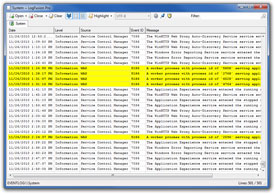
Head over to the LogFusion website for more information, and grab this free download today!
FileSeek 2.0.4 has been released, and is ready for download! This new version changes a few small things. The "Query" field is now focused after a search is complete so you can easily type in a new query string and search again. In an effort to help you find the files you are looking for, the date filter can now be toggled between "Date Created" and "Date Modified". Previously, this only filtered on "Date Modified".
I would encourage everyone using FileSeek to download the new version today to take advantage of these new features. Thanks everyone!
I am very happy to announce the release of TrayStatus 1.2.1! This new version is a small update that adds support for showing the status of the Windows key, as well as lowering CPU usage. If you have a notebook or keyboard without a NumLock or CapsLock indicator, or a computer without a hard drive activity LED, then TrayStatus is for you. TrayStatus can show you the following information in your taskbar's notification area (system tray):
You can download this new version from the TrayStatus Download page.